
How to Keep Track of Books You've Read
Five ways to keep a reading log, compared honestly, with a free spreadsheet, printable pages and formulas to start today.
A reading log answers questions memory can't: what you read the summer you moved, which author you binged three years ago, whether you really read more last year. There are five good ways to keep one: a paper journal, a spreadsheet, Goodreads, a tracking app, or an app and a journal together. Here's what each costs you in time and gives back, with a spreadsheet setup you can copy and a system for combining paper with an app.
Last reviewed
Choose by What You Want Back
Every method records the same basic thing: a list of books with dates. Where they differ is what they give back. A notebook gives you memory and reflection, a spreadsheet gives you numbers, Goodreads gives you other readers, and an app gives you numbers without the typing. The table near the end compares all five.
The best method is the one you'll still be using in December. Most reading logs die of friction rather than the wrong choice, so weigh how long each entry takes as heavily as what it produces.
Method 1: A Notebook or Reading Journal
The simplest reading log is one line per finished book: title, author, date finished, format and a rating. Number every entry, so the last number is your running total and you never have to count. Keep the first page as an index by month and the back pages for quotes, and a plain notebook works as well as any designer journal. If you'd rather not rule your own pages, our free Reading Journal Kit gives you a reading log, monthly trackers, review pages and a year-in-books page, ready to print.
Paper's strengths are real: writing by hand helps you remember what you read, and a notebook never needs charging or an account. Its weaknesses are just as real: you can't search it, statistics mean counting by hand, and if you lose it you lose the history. Photograph the pages once a year, so a lost notebook doesn't mean a lost record.
Method 2: A Spreadsheet
A spreadsheet gives you total control. Start with eight columns: Title, Author, Format (print, ebook or audio), Pages, Started, Finished, Rating and Status (read, reading or did not finish). Extra columns like genre, source and price are optional, and they're the first ones people stop filling in.
With pages in column D, finish dates in column F and ratings in column G, three formulas give you a year in review in Google Sheets or Excel: the number of books you've finished this year, the pages you've read, and your average rating. They always use the current year; to look back, replace YEAR(TODAY()) with a year such as 2025.
=COUNTIFS(F:F,">="&DATE(YEAR(TODAY()),1,1),F:F,"<"&DATE(YEAR(TODAY())+1,1,1))=SUMIFS(D:D,F:F,">="&DATE(YEAR(TODAY()),1,1),F:F,"<"&DATE(YEAR(TODAY())+1,1,1))=AVERAGEIFS(G:G,F:F,">="&DATE(YEAR(TODAY()),1,1),F:F,"<"&DATE(YEAR(TODAY())+1,1,1))Or skip the setup: the free reading log spreadsheet has these columns and formulas built in, with a Year in Review sheet that also counts audiobooks, books you didn't finish and books by month.
If you've used Goodreads, don't start from a blank sheet: its library export is a spreadsheet file with every book, your ratings, page counts and read dates. Open it in Google Sheets rather than Excel, which can turn ISBNs into scientific notation. The catch with any spreadsheet is friction: every book is a row you type, and plenty of readers build a lovely template in January and abandon it by March.
Method 3: Goodreads
Goodreads is still the biggest place to log books, with more than 150 million members, reviews for almost every book in print and an annual Reading Challenge. Since 2026 it has a built-in Did Not Finish shelf, and it syncs with Kindle, so books you read there can count automatically.
The trade-offs: everything you log is social by default, and its statistics stop at the Reading Challenge and a Year in Books recap. If other readers' reviews are what you want most, it's hard to beat. If you want deeper statistics with a similar social side, The StoryGraph is the usual next stop, with mood tags and detailed charts; our Goodreads vs StoryGraph comparison sets them side by side. If you want a private log, the next two methods fit better, and our guide to Goodreads alternatives compares the options.
Method 4: A Book Tracking App
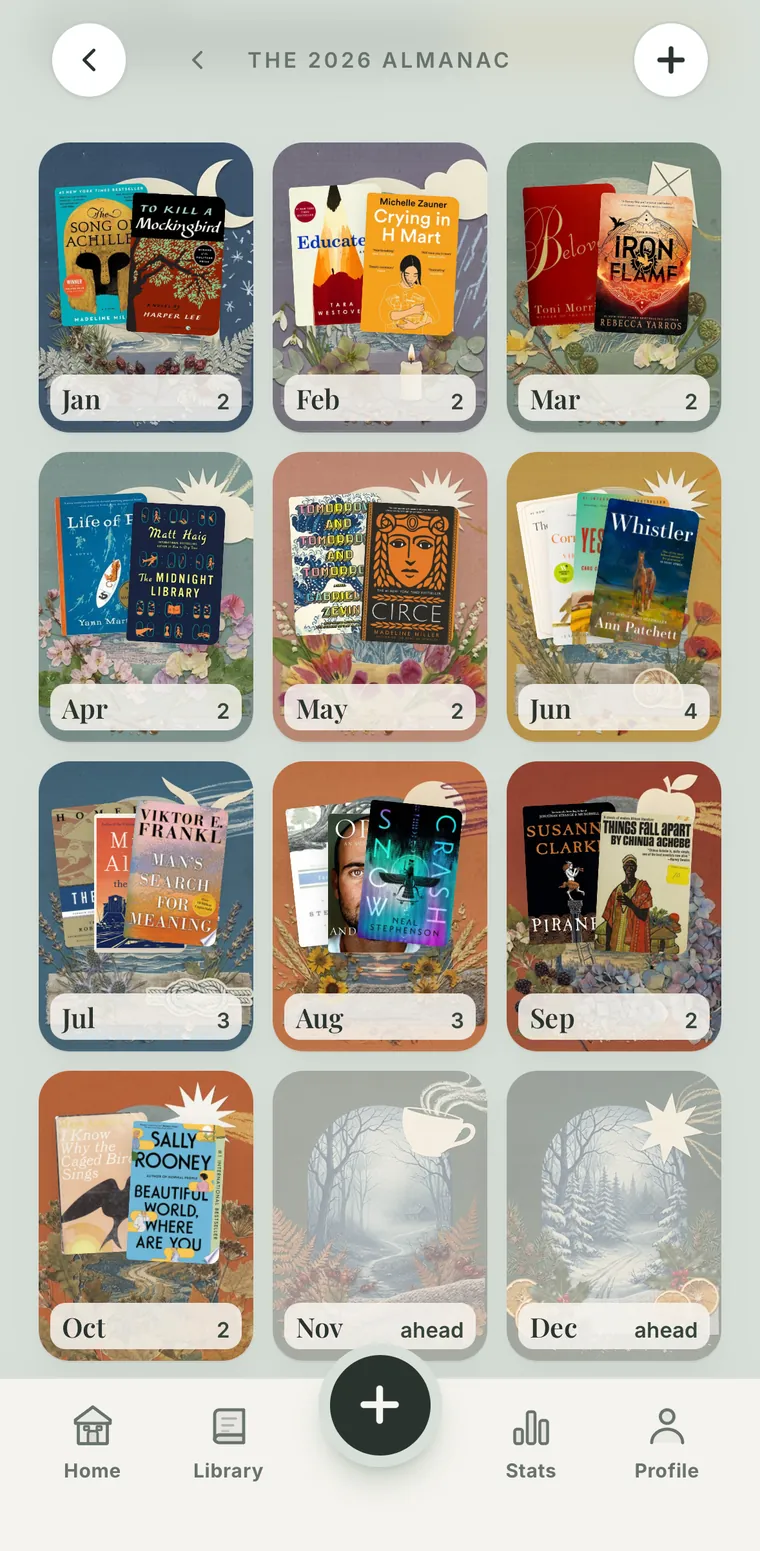
For most readers, a dedicated tracking app is the sweet spot: the look of a shelf, with real covers, and the power of a spreadsheet without the typing. Adding a book should take seconds by searching or scanning the barcode, and statistics, streaks and yearly recaps build themselves. Apps also catch what paper and spreadsheets miss, like reading sessions timed as you go and audiobook minutes counted alongside printed pages.
Before you commit years of logging to one, check four things: that it logs pages and minutes for print and audio, that notes and quotes live with each book, that it imports your Goodreads history if you have one, and above all that it exports your library, so your record is never locked in. Parch passes all four.
Here's what Parch adds on top. It's built around the reading session: start a timer, read or listen, and pages for print and minutes for audiobooks land in one history, feeding a daily streak. After a couple of sessions it knows your pace and shows when you'll finish the book. Add a book by searching or scanning its barcode, scan a quote straight from the page instead of typing it, and see every day you read on a monthly calendar, with month and year recaps. Your library is private by default, with no feed or followers; create a free account and it syncs and backs up across your devices.
Method 5: An App and a Journal Together
If you love a paper journal but hate doing arithmetic in it, split the work. The app does the daily logging: dates, pages, sessions, ratings, the numbers. The journal does the occasional reflection: a monthly wrap-up, quotes copied out by hand, a page on the book that wrecked you. Numbers in the app, feelings on paper. Our free Reading Journal Kit is made for the paper half: reading goals, monthly pages and a year-in-books spread to fill in by hand.
Two rules keep it sustainable. Nothing gets recorded twice, and daily logging takes under 30 seconds. A good test: if you skipped the journal for a month, would your log still be complete? In a healthy setup it would, because the app never depends on the journal.
How to Start Today
Don't try to rebuild your whole reading history on day one; it's the fastest way to burn out before you start. Log the book you're reading now, add the handful of recent reads you remember, and fill in the rest as memories surface. If you're coming from Goodreads, import its export instead and skip the typing.
Then tie logging to the moment you stop reading: close the book, log the page. Ten seconds a day is all a lifelong reading record costs.
At a Glance
| Method | Effort per book | Statistics | Private? | Best for |
|---|---|---|---|---|
| Notebook | A few minutes | Counted by hand | Yes | Memory and reflection |
| Spreadsheet | A minute of typing | With formulas | Yes | Total control |
| Goodreads | Seconds | Challenge and Year in Books | Social by default | Reviews and community |
| Tracking app | Seconds | Automatic | Depends on the app | Numbers without typing |
| App + journal | Seconds, plus journal time | Automatic | Depends on the app | Numbers and reflection |
Notebooks and spreadsheets cost next to nothing; Goodreads is free with ads; most tracking apps are free to start with an optional subscription. Whatever you pick, make sure you can export your record.
Frequently Asked Questions
What is the best way to keep track of books you've read?
The one you'll keep up. A book tracking app is easiest for most people because adding a book takes seconds and the statistics are automatic. A paper journal is better for reflection, a spreadsheet for total control, and an app plus a journal gives you both numbers and reflection.
How do I track books read in Google Sheets?
Use eight columns: Title, Author, Format, Pages, Started, Finished, Rating and Status. With pages in column D, finish dates in F and ratings in G, COUNTIFS counts the books finished in a year, SUMIFS adds up the pages and AVERAGEIFS gives your average rating. The exact formulas are in the spreadsheet section above, or download the free reading log spreadsheet with them built in.
Can I turn my Goodreads history into a spreadsheet?
Yes. Export your library from Goodreads (My Books → Import and Export → Export Library) and open the CSV in Google Sheets. It includes every book with your ratings, page counts and read dates. Avoid opening it in Excel first, which can turn ISBNs into scientific notation.
Should I track books I didn't finish?
Yes. A did-not-finish list stops you re-borrowing a book you already abandoned, and over time it shows what doesn't work for you, which is as useful as knowing what does.
Isn't tracking in an app and a journal double the work?
Only if both record the same things. Split them: the app logs dates, pages, ratings and streaks in seconds each day, and the journal holds reflections, quotes and monthly wrap-ups when you feel like writing. The total effort is lower than making either tool do both jobs.
Can I track audiobooks and print books together?
With a good app, yes. Look for one that logs minutes for audiobooks and pages for print and combines both into one history. Parch, for example, counts a listening session and a reading session as equal progress.
Put this guide into practice
Time your reading sessions, keep a daily streak and see when you'll finish every book. Free on iPhone and Android.
The 2026 Reading Journal Kit
Six printable pages to log, plan and celebrate your reading year. Enter your email and we'll send the PDF straight to your inbox.
- Reading log
- TBR planner
- Monthly tracker
- Ratings & reviews
- Reading bingo
- Year in books