
Parch vs Goodreads: Which Should You Use?
An honest comparison of the classic platform and the modern private tracker.
Goodreads is the book platform everyone knows; Parch is a modern tracker built around privacy, reading sessions and design. They're genuinely good at different things. This comparison lays out where each one wins, so you can decide in five minutes which fits how you read, or whether you should use both.
Last reviewed
The Short Version
Choose Goodreads if what you want most is other people: the biggest review database in the world, friends' bookshelves, giveaways and the famous annual Reading Challenge, or if you read on a Kindle and want your progress logged automatically. Choose Parch if what you want most is to actually read more: timed reading sessions for print and audiobooks, a daily streak, a plan that paces a book to the date you want to finish it, and a private library with monthly stats Goodreads has never offered.
Plenty of readers use both: Goodreads for browsing reviews before buying, Parch for the daily tracking. Since Parch imports your Goodreads library in one step, trying that split costs nothing.
Where Goodreads Wins
Community scale is Goodreads' unassailable advantage. With more than 150 million members, nearly every book ever published has ratings and reviews, and that corpus is genuinely useful when you're deciding what to read next. Author Q&As, giveaways and group read-alongs all live on that scale.
Kindle is the other big one. Goodreads has been owned by Amazon since 2013, and it syncs with Kindle, so books and progress from your Kindle can be logged without you doing anything. If most of your reading happens on a Kindle, that's a real reason to stay.
It's also free everywhere, has years of your friends' reading history if your circle uses it, and its Reading Challenge has become a cultural ritual. If your reading life is fundamentally social, and you pick books because people you follow loved them, Goodreads still does that job better than anyone.
Where Parch Wins
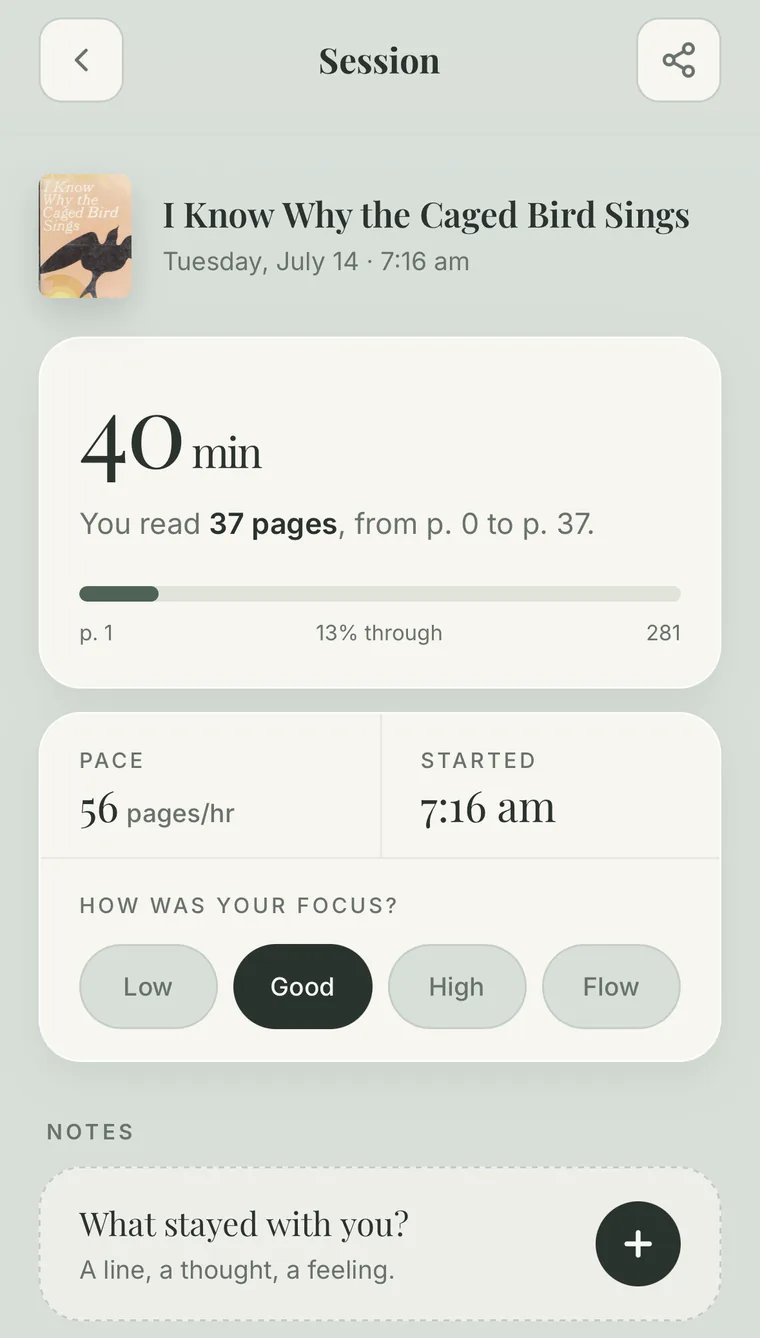
Parch wins on the reading itself. Goodreads tracks which books you read; Parch tracks how you read them. Logging a session takes seconds, with a timer if you want one; pages count for print and minutes count for audiobooks, and every session feeds a daily streak. After a couple of sessions Parch knows your pace and shows when you'll finish the book. With Premium, the reading guide goes a step further: pick the date you want to finish and the days you read, and it paces the book out, tells you whether you're on track, ahead or behind, and reminds you on your reading days. Fall behind and it asks whether to keep the date, keep your usual pace or pick a new date.
It also gives you more to look back on. A monthly stats page with a calendar view shows every day you read, alongside streaks, genre breakdowns and an annual recap, far beyond Goodreads' year-end summary. Notes and quotes live on each book, and you can scan text straight from a page instead of typing it out. When you do want to share, you choose what: a reading session's stats, your review of a book, or your month or year in reading, each as a card ready to post. And one book can be print, ebook and audiobook at once, with listening counted as reading.
And it's private by default. Your library, ratings and notes are yours alone unless you share them, with no feed and no followers. Create a free account and they sync and back up across your devices. For ratings, you drag in quarter stars, just like Goodreads, then fine-tune to the hundredth, so a book can be a 4.73 rather than the nearest quarter star. Half and quarter stars you've given on Goodreads come across exactly when you import.
The Deciding Questions
Ask yourself four things. First: when you finish a book, do you want to tell people about it, or just log it and pick the next one? Social answer, Goodreads; private answer, Parch. Second: do you struggle more with choosing books or with finishing them? Choosing, Goodreads' reviews help. Finishing, Parch's sessions, streaks and reading plan are built for it. Third: do you listen to audiobooks? Goodreads treats an audiobook as just another edition; Parch counts listening minutes as real progress. Fourth: do you mostly read on a Kindle? Goodreads logs it for you; Parch doesn't connect to Kindle, so you'd log those sessions yourself.
And if the answer is a bit of both, keep the Goodreads account for discovery and run your daily tracking in Parch. The one-step import means your history exists in both places from day one.
What About the Reading Challenge?
It's the thing people most worry about losing. Parch has the private version: in Profile, then Goals & Challenges, set a Books goal. Yearly is the default (it suggests 12 books), and you can switch to monthly or weekly. It counts every book you finish in that period, including books imported from Goodreads with a finish date, so a year you've already started on Goodreads carries straight over. You can also set a goal for pages, reading time or listening time, which the Reading Challenge can't track: it only counts books.
The difference is that nobody else sees it. There's no public challenge page and no progress bar on a profile, which is the point for many readers. If you want to share how the year is going, a monthly or yearly recap card does that on your terms. Our guide to why tracking your reading works has more on keeping a goal from turning into pressure.
Switching (or Running Both) Takes Five Minutes
Parch walks you through it, when you set up or any time from Profile, then Import / Export, then Import from Goodreads. It opens Goodreads in a secure browser window inside Parch (your password stays with Goodreads); you sign in, tap Export Library and tap the download link, and Parch takes it from there. Already have the file? Use "I already have my Goodreads file" (our export guide covers exporting by hand). Your shelves, ratings, read dates, reviews, private notes and reread counts come across, custom shelves become tags, covers load automatically, and nothing is deleted from your Goodreads account. Sign in with a free account to back up and sync the imported library.
Curious what your Goodreads history adds up to first? Drop the same file into our free Goodreads Wrapped tool to see your stats, then import it. And if you're weighing other apps too, our Goodreads alternatives guide compares them, and our half-star ratings guide covers Goodreads' new ratings.
At a Glance
| Parch | Goodreads | |
|---|---|---|
| Best for | Private daily tracking & habits | Community, reviews & discovery |
| Privacy | Private by default | Social by default |
| Platforms | iPhone and Android (no web version yet) | Web, iPhone, Android and Kindle |
| Kindle sync | No; log Kindle reading yourself | Yes, progress syncs from Kindle |
| Reading streaks & sessions | Yes, core feature, with timer | No |
| Your pace & finish estimate | Yes, from your timed sessions | No |
| Reading goals | Private goals for books, pages, reading time or listening time, per year, month or week | Reading Challenge (books per year), shown on your profile |
| Cloud sync & backup | Free with an account | Yes, with an account |
| Plan a book to a finish date | Yes, reading guide with on-track check-ins (Premium) | No |
| Star ratings | Quarter stars, fine-tune to two decimals (e.g. 4.73) | Half & quarter stars (since Oct 2026) |
| Audiobook time tracking | Yes, minutes count as progress | Editions only, no time tracking |
| Stats | Monthly stats with calendar view, streaks, genre breakdowns, annual recap | Year in Books recap and yearly totals |
| Shelves | To Read, In Progress, Finished, On hold, Didn't finish | Want to read, currently reading, read, DNF (added 2026) |
| Tags & collections | Custom tags and collections, yours to define | Custom shelves |
| Review database | Personal notes & reviews | Largest in the world |
| Notes & quotes | On each book; scan text from a page | Private notes and a public quotes database |
| Sharing | Cards for sessions, reviews, monthly and yearly recaps; send a book to a friend by text or email | Reviews and updates to followers |
| Import & export | Goodreads CSV import; backup file you can restore | CSV export |
| Price | Free, optional Premium | Free (ad-supported) |
Frequently Asked Questions
Is Parch better than Goodreads?
For building a reading habit, with private tracking, timed sessions, daily streaks, a plan to finish by a date and monthly stats, yes. For browsing millions of community reviews, social features and Kindle syncing, Goodreads still wins. Many readers use Parch for tracking and Goodreads for discovery.
Can I move my Goodreads books to Parch?
Yes. In Parch, go to Profile, then Import / Export, then Import from Goodreads (or start from the welcome screens). Parch opens Goodreads inside the app, you sign in and tap Export Library, and your library moves in. If you already have the CSV, choose "I already have my Goodreads file". Shelves, ratings, read dates, reviews, private notes and reread counts all come across.
Does Parch sync with Kindle?
No. Parch doesn't connect to a Kindle account, so it can't sync progress or import highlights. You log Kindle reading in Parch yourself, with a session or a page update. If a Goodreads shelf is named Kindle, it comes across as a tag when you import.
Does Parch have a reading challenge like Goodreads?
It has a private one. In Profile, then Goals & Challenges, set a Books goal for the year (or month or week). It counts every book you finish, including imported ones with a finish date. You can also set goals for pages, reading time or listening time. Only you can see them; there's no public challenge page.
Is Parch free?
Yes. Tracking, streaks, stats, the Goodreads import, and sync with a free account are all free. An optional Premium subscription adds extras such as the reading guide that paces a book to a finish date.
Do I have to delete my Goodreads account to use Parch?
No. Nothing about using Parch affects your Goodreads account, and running both is common: keep Goodreads for reviews, friends and Kindle, and track your daily reading in Parch.
Put this guide into practice
Time your reading sessions, keep a daily streak and see when you'll finish every book. Free on iPhone and Android.
The 2026 Reading Journal Kit
Six printable pages to log, plan and celebrate your reading year. Enter your email and we'll send the PDF straight to your inbox.
- Reading log
- TBR planner
- Monthly tracker
- Ratings & reviews
- Reading bingo
- Year in books